表格布局(TableLayout),是通过表格来管理内部的组件排列,表格管理器通过设定行和列来划分区域,布局管理器中的列可以设置为隐藏或者伸展,这些都是他们的特性,TableLayout布局是有行组成的TableRow,每个TableRow里可以放置所需要的组件。
1.collapseColumns:设置需要被隐藏的列的序号(序列号从0开始),多个列之间用,分隔------------隐藏列 2.android:shrinkColumns:设置允许被收缩的列的列序号------- ------------------------------------------ ----收缩列 3.android:stretchColumns:设置运行被拉伸的列的列序号------------------------------------------------------拉伸列 4.android:layout_column=“2”:表示的就是跳过第二个,直接显示到第三个格子处,从1开始算的!-------跳格 5.android:layout_span=“4”:表示合并4个单元 格,也就说这个组件占4个单元格---------------------------合并单元格 注:前三个起始数字都是0,可用逗号隔开,所有用 “*”
效果: 没有隐藏 android:collapseColumns=“0,2” 隐藏1,3,行 有隐藏 android:collapseColumns=“0,2” 隐藏1,3,行
设置四行四列,
<TableLayout xmlns:android="http://schemas.android.com/apk/res/android" xmlns:tools="http://schemas.android.com/tools" android:layout_width="match_parent" android:layout_height="match_parent" tools:context="${relativePackage}.${activityClass}" android:stretchColumns="0,3" `没有此行,只能垂直居中,水平效果显示不出来` android:gravity="center_vertical" > <TableRow > <TextView /> `占位` <TextView android:layout_width="wrap_content" android:layout_height="wrap_content" android:text="用户名" /> <EditText android:layout_width="wrap_content" android:layout_height="wrap_content" android:minWidth="150dp" /> <TextView /> `占位` </TableRow> <TableRow > <TextView /> <TextView android:layout_width="wrap_content" android:layout_height="wrap_content" android:text="密 码" /> <EditText android:layout_width="wrap_content" android:layout_height="wrap_content" android:minWidth="150dp" /> <TextView /> </TableRow> <TableRow > <TextView /> <Button android:layout_width="wrap_content" android:layout_height="wrap_content" android:text="登录" /> <Button android:layout_width="wrap_content" android:layout_height="wrap_content" android:text="注册" /> </TableRow> <TextView /> </TableLayout><TableLayout xmlns:android=“http://schemas.android.com/apk/res/android”
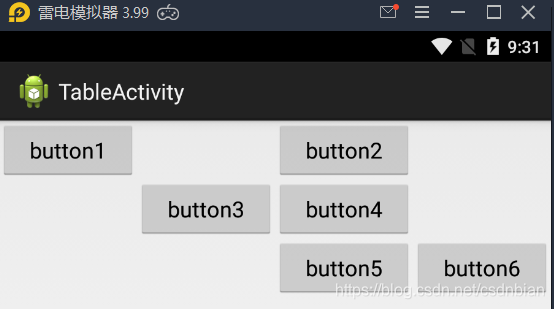
android:layout_width="match_parent" android:layout_height="match_parent" android:stretchColumns="0,1,2,3" > <TableRow > <Button android:layout_width="wrap_content" android:layout_height="wrap_content" android:text="button1" android:layout_column="0" /> <Button android:layout_width="wrap_content" android:layout_height="wrap_content" android:text="button2" android:layout_column="2" /> </TableRow> <TableRow > <Button android:layout_width="wrap_content" android:layout_height="wrap_content" android:text="button3" android:layout_column="1" /> <Button android:layout_width="wrap_content" android:layout_height="wrap_content" android:text="button4" /> </TableRow> <TableRow > <Button android:layout_width="wrap_content" android:layout_height="wrap_content" android:text="button5" android:layout_column="2" /> <Button android:layout_width="wrap_content" android:layout_height="wrap_content" android:text="button6" /> </TableRow> ### 效果