
Elasticsearch 使用一种称为 倒排索引 的结构,它适用于快速的全文搜索。一个倒排索引由文档中所有不重复词的列表构成,对于其中每个词,有一个包含它的文档列表。
倒排索引原理
docker中安装elastic search (1)下载elastic search和kibana
docker pull elasticsearch:7.6.2 docker pull kibana:7.6.2(2)配置
mkdir -p /mydata/elasticsearch/config mkdir -p /mydata/elasticsearch/data echo "http.host: 0.0.0.0" >/mydata/elasticsearch/config/elasticsearch.yml chmod -R 777 /mydata/elasticsearch/(3)启动Elastic search
docker run --name elasticsearch -p 9200:9200 -p 9300:9300 \ -e "discovery.type=single-node" \ -e ES_JAVA_OPTS="-Xms64m -Xmx512m" \ -v /mydata/elasticsearch/config/elasticsearch.yml:/usr/share/elasticsearch/config/elasticsearch.yml \ -v /mydata/elasticsearch/data:/usr/share/elasticsearch/data \ -v /mydata/elasticsearch/plugins:/usr/share/elasticsearch/plugins \ -d elasticsearch:7.6.2设置开机启动elasticsearch
docker update elasticsearch --restart=always(4)启动kibana:
docker run --name kibana -e ELASTICSEARCH_HOSTS=http://192.168.56.10:9200 -p 5601:5601 -d kibana:7.6.2设置开机启动kibana
docker update kibana --restart=always(5)测试 查看elasticsearch版本信息: http://192.168.56.10:9200/
{ "name": "d30f21ec35fc", "cluster_name": "elasticsearch", "cluster_uuid": "OidCLBVNSP2su8UiNJl9oA", "version": { "number": "7.6.2", "build_flavor": "default", "build_type": "docker", "build_hash": "ef48eb35cf30adf4db14086e8aabd07ef6fb113f", "build_date": "2020-03-26T06:34:37.794943Z", "build_snapshot": false, "lucene_version": "8.4.0", "minimum_wire_compatibility_version": "6.8.0", "minimum_index_compatibility_version": "6.0.0-beta1" }, "tagline": "You Know, for Search" }显示elasticsearch 节点信息http://192.168.56.10:9200/_cat/nodes
127.0.0.1 16 86 8 0.00 0.12 0.24 dilm * d30f21ec35fc访问Kibana: http://192.168.56.10:5601/app/kibana
(1) GET/cat/nodes:查看所有节点 如:http://192.168.56.10:9200/_cat/nodes
127.0.0.1 15 88 0 0.06 0.03 0.11 dilm * d30f21ec35fc注:*表示集群中的主节点
(2)GET/cat/health:查看es健康状况 如: http://192.168.56.10:9200/_cat/health
1599568858 12:40:58 elasticsearch green 1 1 3 3 0 0 0 0 - 100.0%注:green表示健康值正常
(3)GET /cat/master:查看主节点 如: http://192.168.56.10:9200/_cat/master
QeMO9rMQSj2UjNvuxaNQqg 127.0.0.1 127.0.0.1 d30f21ec35fc(4)GET/_cat/indices:查看所有索引 ,等价于mysql数据库的show databases; 如: http://192.168.56.10:9200/_cat/indices
green open .kibana_task_manager_1 wldcIEtbT3uQfH_copflYw 1 0 2 1 26.8kb 26.8kb green open .apm-agent-configuration g5iOaK05QrSSmenBQtqupg 1 0 0 0 283b 283b green open .kibana_1 2kGHFyKBSCmS8lU1loIqVg 1 0 6 0 22.6kb 22.6kb保存一个数据,保存在哪个索引的哪个类型下,指定用那个唯一标识 PUT customer/external/1 在customer索引下的external类型下保存1号数据为
{ "name":"John Doe" }PUT和POST都可以 POST新增。如果不指定id,会自动生成id。指定id就会修改这个数据,并新增版本号; PUT可以新增也可以修改。PUT必须指定id;由于PUT需要指定id,我们一般用来做修改操作,不指定id会报错。 下面是在postman中的测试数据: 创建数据成功后,显示201 created表示插入记录成功。
{ "_index": "customer", "_type": "external", "_id": "1", "_version": 1, "result": "created", "_shards": { "total": 2, "successful": 1, "failed": 0 }, "_seq_no": 0, "_primary_term": 1 }这些返回的JSON串的含义;这些带有下划线开头的,称为元数据,反映了当前的基本信息。 “_index”: “customer” 表明该数据在哪个数据库下; “_type”: “external” 表明该数据在哪个类型下; “_id”: “1” 表明被保存数据的id; “_version”: 1, 被保存数据的版本 “result”: “created” 这里是创建了一条数据,如果重新put一条数据,则该状态会变为updated,并且版本号也会发生变化。 下面选用POST方式: 添加数据的时候,不指定ID,会自动的生成id,并且类型是新增:
再次使用POST插入数据,仍然是新增的:
添加数据的时候,指定ID,会使用该id,并且类型是新增:
再次使用POST插入数据,类型为updated
GET /customer/external/2 http://192.168.56.10:9200/customer/external/1
{ "_index": "customer", //在哪个索引 "_type": "external",//在哪个类型 "_id": "2",//记录id "_version": 2,//版本号 "_seq_no": 4,//并发控制字段,每次更新都会+1,用来做乐观锁 "_primary_term": 1, //同上,主分片重新分配,如重启,就会变化 "found": true, "_source": { // 真正内容 "name": "John Doe" } }通过“if_seq_no=1&if_primary_term=1 ”,当序列号匹配的时候,才进行修改,否则不修改。 实例:将id=2的数据更新为name=1,然后再次更新为name=2,起始_seq_no=4,_primary_term=1 (1)将name更新为1 http://192.168.56.10:9200/customer/external/2?if_seq_no=6&if_primary_term=1
(2)将name更新为2,更新过程中使用seq_no=6 http://192.168.56.10:9200/customer/external/2?if_seq_no=6&if_primary_term=1 出现更新错误。
(3)将name更新为2,更新过程中使用seq_no=5 http://192.168.56.10:9200/customer/external/2?if_seq_no=5&if_primary_term=1 更新成功。
(1)POST更新文档,带有_update http://192.168.56.10:9200/customer/external/2/_update 如果再次执行更新,则不执行任何操作,序列号也不发生变化
{ "_index": "customer", "_type": "external", "_id": "2", "_version": 5, "result": "noop", "_shards": { "total": 0, "successful": 0, "failed": 0 }, "_seq_no": 8, "_primary_term": 1 }POST更新方式,会对比原来的数据,和原来的相同,则不执行任何操作(version和_seq_no)都不变。 (2)POST更新文档,不带_update
{ "_index": "customer", "_type": "external", "_id": "2", "_version": 6, "result": "updated", "_shards": { "total": 2, "successful": 1, "failed": 0 }, "_seq_no": 9, "_primary_term": 1 }在更新过程中,重复执行更新操作,数据也能够更新成功,不会和原来的数据进行对比。
注:elasticsearch并没有提供删除类型的操作,只提供了删除索引和文档的操作。 实例:删除id=1的数据,删除后继续查询 实例:customer 删除前,所有的索引
green open .kibana_task_manager_1 wldcIEtbT3uQfH_copflYw 1 0 2 1 26.8kb 26.8kb green open .apm-agent-configuration g5iOaK05QrSSmenBQtqupg 1 0 0 0 283b 283b green open .kibana_1 2kGHFyKBSCmS8lU1loIqVg 1 0 6 0 22.6kb 22.6kb yellow open customer KjaEuF2-TpaqKWeidOgJUA 1 1 4 1 17.6kb 17.6kb删除“ customer ”索引
{ "acknowledged": true }删除后,所有的索引
green open .kibana_task_manager_1 wldcIEtbT3uQfH_copflYw 1 0 2 1 26.8kb 26.8kb green open .apm-agent-configuration g5iOaK05QrSSmenBQtqupg 1 0 0 0 283b 283b green open .kibana_1 2kGHFyKBSCmS8lU1loIqVg 1 0 6 0 22.6kb 22.6kb语法格式:
{action:{metadata}}\n {request body }\n {action:{metadata}}\n {request body }\n这里的批量操作,当发生某一条执行发生失败时,其他的数据仍然能够接着执行,也就是说彼此之间是独立的。 bulk api以此按顺序执行所有的action(动作)。如果一个单个的动作因任何原因失败,它将继续处理它后面剩余的动作。当bulk api返回时,它将提供每个动作的状态(与发送的顺序相同),所以您可以检查是否一个指定的动作是否失败了。
实例1: 执行多条数据
POST customer/external/_bulk {"index":{"_id":"1"}} {"name":"John Doe"} {"index":{"_id":"2"}} {"name":"John Doe"}执行结果
实例2:对于整个索引执行批量操作
POST /_bulk {"delete":{"_index":"website","_type":"blog","_id":"123"}} {"create":{"_index":"website","_type":"blog","_id":"123"}} {"title":"my first blog post"} {"index":{"_index":"website","_type":"blog"}} {"title":"my second blog post"} {"update":{"_index":"website","_type":"blog","_id":"123"}} {"doc":{"title":"my updated blog post"}}运行结果:
{ "took" : 289, "errors" : false, "items" : [ { "delete" : { "_index" : "website", "_type" : "blog", "_id" : "123", "_version" : 1, "result" : "not_found", "_shards" : { "total" : 2, "successful" : 1, "failed" : 0 }, "_seq_no" : 0, "_primary_term" : 1, "status" : 404 } }, { "create" : { "_index" : "website", "_type" : "blog", "_id" : "123", "_version" : 2, "result" : "created", "_shards" : { "total" : 2, "successful" : 1, "failed" : 0 }, "_seq_no" : 1, "_primary_term" : 1, "status" : 201 } }, { "index" : { "_index" : "website", "_type" : "blog", "_id" : "thn6bXQBrGHPZfvxjEyh", "_version" : 1, "result" : "created", "_shards" : { "total" : 2, "successful" : 1, "failed" : 0 }, "_seq_no" : 2, "_primary_term" : 1, "status" : 201 } }, { "update" : { "_index" : "website", "_type" : "blog", "_id" : "123", "_version" : 3, "result" : "updated", "_shards" : { "total" : 2, "successful" : 1, "failed" : 0 }, "_seq_no" : 3, "_primary_term" : 1, "status" : 200 } } ] }准备了一份顾客银行账户信息的虚构的JSON文档样本。每个文档都有下列的schema(模式)。
{ "account_number": 1, "balance": 39225, "firstname": "Amber", "lastname": "Duke", "age": 32, "gender": "M", "address": "880 Holmes Lane", "employer": "Pyrami", "email": "amberduke@pyrami.com", "city": "Brogan", "state": "IL" }https://github.com/elastic/elasticsearch/blob/master/docs/src/test/resources/accounts.json ,导入官方测试数据, POST bank/account/_bulk
ES支持两种基本方式检索;
通过REST request uri 发送搜索参数 (uri +检索参数);通过REST request body 来发送它们(uri+请求体);信息检索 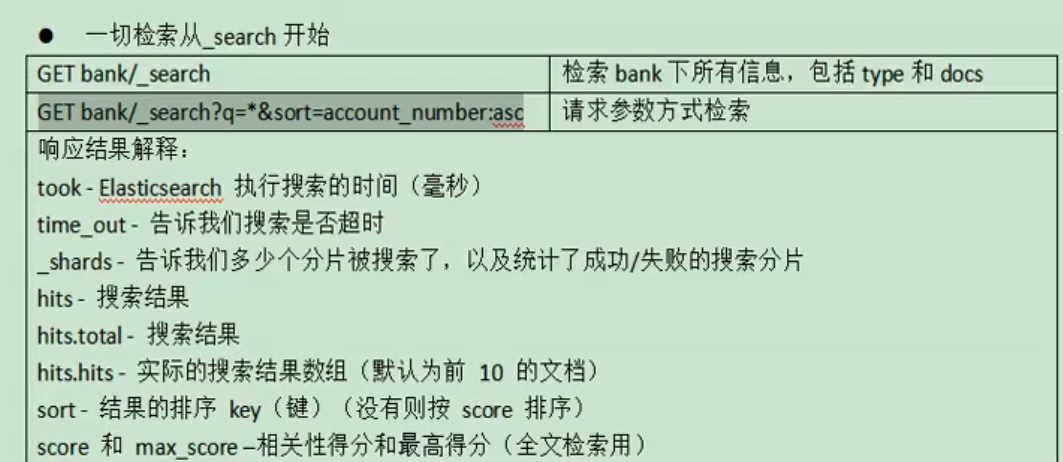 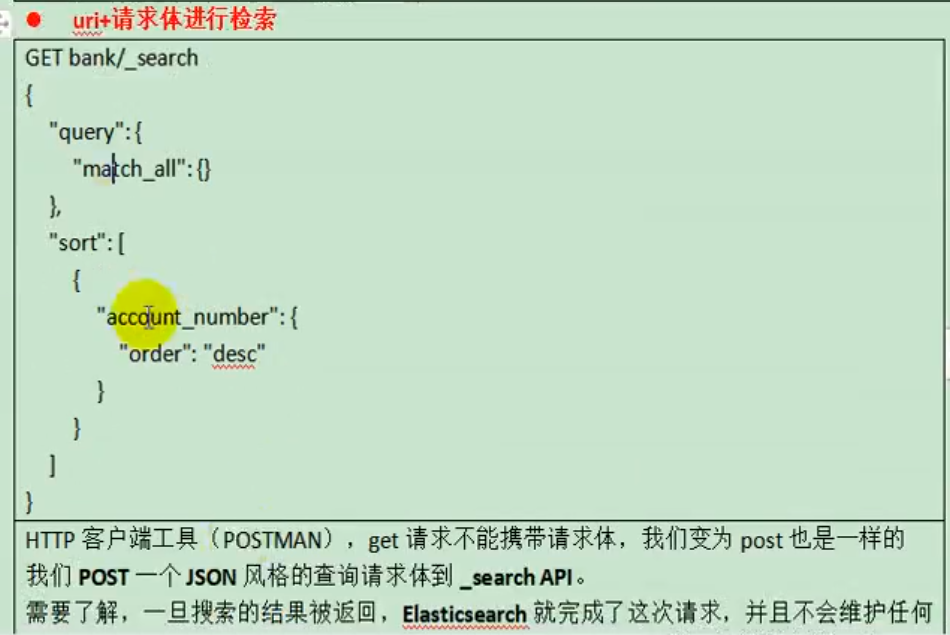  uri+请求体进行检索
GET /bank/_search { "query": { "match_all": {} }, "sort": [ { "account_number": "asc" }, {"balance":"desc"} ] }HTTP客户端工具(),get请求不能够携带请求体,
GET bank/_search?q=*&sort=account_number:asc返回结果:
{ "took" : 46, "timed_out" : false, "_shards" : { "total" : 1, "successful" : 1, "skipped" : 0, "failed" : 0 }, "hits" : { "total" : { "value" : 1000, "relation" : "eq" }, "max_score" : null, "hits" : [ { "_index" : "bank", "_type" : "account", "_id" : "0", "_score" : null, "_source" : { "account_number" : 0, "balance" : 16623, "firstname" : "Bradshaw", "lastname" : "Mckenzie", "age" : 29, "gender" : "F", "address" : "244 Columbus Place", "employer" : "Euron", "email" : "bradshawmckenzie@euron.com", "city" : "Hobucken", "state" : "CO" }, "sort" : [ 0 ] }, { "_index" : "bank", "_type" : "account", "_id" : "1", "_score" : null, "_source" : { "account_number" : 1, "balance" : 39225, "firstname" : "Amber", "lastname" : "Duke", "age" : 32, "gender" : "M", "address" : "880 Holmes Lane", "employer" : "Pyrami", "email" : "amberduke@pyrami.com", "city" : "Brogan", "state" : "IL" }, "sort" : [ 1 ] }, { "_index" : "bank", "_type" : "account", "_id" : "2", "_score" : null, "_source" : { "account_number" : 2, "balance" : 28838, "firstname" : "Roberta", "lastname" : "Bender", "age" : 22, "gender" : "F", "address" : "560 Kingsway Place", "employer" : "Chillium", "email" : "robertabender@chillium.com", "city" : "Bennett", "state" : "LA" }, "sort" : [ 2 ] }, { "_index" : "bank", "_type" : "account", "_id" : "3", "_score" : null, "_source" : { "account_number" : 3, "balance" : 44947, "firstname" : "Levine", "lastname" : "Burks", "age" : 26, "gender" : "F", "address" : "328 Wilson Avenue", "employer" : "Amtap", "email" : "levineburks@amtap.com", "city" : "Cochranville", "state" : "HI" }, "sort" : [ 3 ] }, { "_index" : "bank", "_type" : "account", "_id" : "4", "_score" : null, "_source" : { "account_number" : 4, "balance" : 27658, "firstname" : "Rodriquez", "lastname" : "Flores", "age" : 31, "gender" : "F", "address" : "986 Wyckoff Avenue", "employer" : "Tourmania", "email" : "rodriquezflores@tourmania.com", "city" : "Eastvale", "state" : "HI" }, "sort" : [ 4 ] }, { "_index" : "bank", "_type" : "account", "_id" : "5", "_score" : null, "_source" : { "account_number" : 5, "balance" : 29342, "firstname" : "Leola", "lastname" : "Stewart", "age" : 30, "gender" : "F", "address" : "311 Elm Place", "employer" : "Diginetic", "email" : "leolastewart@diginetic.com", "city" : "Fairview", "state" : "NJ" }, "sort" : [ 5 ] }, { "_index" : "bank", "_type" : "account", "_id" : "6", "_score" : null, "_source" : { "account_number" : 6, "balance" : 5686, "firstname" : "Hattie", "lastname" : "Bond", "age" : 36, "gender" : "M", "address" : "671 Bristol Street", "employer" : "Netagy", "email" : "hattiebond@netagy.com", "city" : "Dante", "state" : "TN" }, "sort" : [ 6 ] }, { "_index" : "bank", "_type" : "account", "_id" : "7", "_score" : null, "_source" : { "account_number" : 7, "balance" : 39121, "firstname" : "Levy", "lastname" : "Richard", "age" : 22, "gender" : "M", "address" : "820 Logan Street", "employer" : "Teraprene", "email" : "levyrichard@teraprene.com", "city" : "Shrewsbury", "state" : "MO" }, "sort" : [ 7 ] }, { "_index" : "bank", "_type" : "account", "_id" : "8", "_score" : null, "_source" : { "account_number" : 8, "balance" : 48868, "firstname" : "Jan", "lastname" : "Burns", "age" : 35, "gender" : "M", "address" : "699 Visitation Place", "employer" : "Glasstep", "email" : "janburns@glasstep.com", "city" : "Wakulla", "state" : "AZ" }, "sort" : [ 8 ] }, { "_index" : "bank", "_type" : "account", "_id" : "9", "_score" : null, "_source" : { "account_number" : 9, "balance" : 24776, "firstname" : "Opal", "lastname" : "Meadows", "age" : 39, "gender" : "M", "address" : "963 Neptune Avenue", "employer" : "Cedward", "email" : "opalmeadows@cedward.com", "city" : "Olney", "state" : "OH" }, "sort" : [ 9 ] } ] } }(1)只有6条数据,这是因为存在分页查询; (2)详细的字段信息,参照: https://www.elastic.co/guide/en/elasticsearch/reference/current/getting-started-search.html
The response also provides the following information about the search request:
took – how long it took Elasticsearch to run the query, in millisecondstimed_out – whether or not the search request timed out_shards – how many shards were searched and a breakdown of how many shards succeeded, failed, or were skipped.max_score – the score of the most relevant document foundhits.total.value - how many matching documents were foundhits.sort - the document’s sort position (when not sorting by relevance score)hits._score - the document’s relevance score (not applicable when using match_all)Elasticsearch提供了一个可以执行查询的Json风格的DSL。这个被称为Query DSL,该查询语言非常全面。 一个查询语句的典型结构
QUERY_NAME:{ ARGUMENT:VALUE, ARGUMENT:VALUE,... }如果针对于某个字段,那么它的结构如下:
{ QUERY_NAME:{ FIELD_NAME:{ ARGUMENT:VALUE, ARGUMENT:VALUE,... } } } GET bank/_search { "query": { "match_all": {} }, "from": 0, "size": 5, "sort": [ { "account_number": { "order": "desc" } } ] }query定义如何查询;
match_all查询类型【代表查询所有的所有】,es中可以在query中组合非常多的查询类型完成复杂查询;除了query参数之外,我们可也传递其他的参数以改变查询结果,如sort,size;from+size限定,完成分页功能;sort排序,多字段排序,会在前序字段相等时后续字段内部排序,否则以前序为准;查询结果:
{ "took" : 1, "timed_out" : false, "_shards" : { "total" : 1, "successful" : 1, "skipped" : 0, "failed" : 0 }, "hits" : { "total" : { "value" : 1000, "relation" : "eq" }, "max_score" : null, "hits" : [ { "_index" : "bank", "_type" : "account", "_id" : "999", "_score" : null, "_source" : { "account_number" : 999, "balance" : 6087, "firstname" : "Dorothy", "lastname" : "Barron", "age" : 22, "gender" : "F", "address" : "499 Laurel Avenue", "employer" : "Xurban", "email" : "dorothybarron@xurban.com", "city" : "Belvoir", "state" : "CA" }, "sort" : [ 999 ] }, { "_index" : "bank", "_type" : "account", "_id" : "998", "_score" : null, "_source" : { "account_number" : 998, "balance" : 16869, "firstname" : "Letha", "lastname" : "Baker", "age" : 40, "gender" : "F", "address" : "206 Llama Court", "employer" : "Dognosis", "email" : "lethabaker@dognosis.com", "city" : "Dunlo", "state" : "WV" }, "sort" : [ 998 ] }, { "_index" : "bank", "_type" : "account", "_id" : "997", "_score" : null, "_source" : { "account_number" : 997, "balance" : 25311, "firstname" : "Combs", "lastname" : "Frederick", "age" : 20, "gender" : "M", "address" : "586 Lloyd Court", "employer" : "Pathways", "email" : "combsfrederick@pathways.com", "city" : "Williamson", "state" : "CA" }, "sort" : [ 997 ] } ] } }match返回account_number=20的数据。 查询结果:
{ "took" : 1, "timed_out" : false, "_shards" : { "total" : 1, "successful" : 1, "skipped" : 0, "failed" : 0 }, "hits" : { "total" : { "value" : 1, "relation" : "eq" }, "max_score" : 1.0, "hits" : [ { "_index" : "bank", "_type" : "account", "_id" : "20", "_score" : 1.0, "_source" : { "account_number" : 20, "balance" : 16418, "firstname" : "Elinor", "lastname" : "Ratliff", "age" : 36, "gender" : "M", "address" : "282 Kings Place", "employer" : "Scentric", "email" : "elinorratliff@scentric.com", "city" : "Ribera", "state" : "WA" } } ] } } 字符串,全文检索 GET bank/_search { "query": { "match": { "address": "kings" } } }全文检索,最终会按照评分进行排序,会对检索条件进行分词匹配。 查询结果:
{ "took" : 10, "timed_out" : false, "_shards" : { "total" : 1, "successful" : 1, "skipped" : 0, "failed" : 0 }, "hits" : { "total" : { "value" : 2, "relation" : "eq" }, "max_score" : 5.990829, "hits" : [ { "_index" : "bank", "_type" : "account", "_id" : "20", "_score" : 5.990829, "_source" : { "account_number" : 20, "balance" : 16418, "firstname" : "Elinor", "lastname" : "Ratliff", "age" : 36, "gender" : "M", "address" : "282 Kings Place", "employer" : "Scentric", "email" : "elinorratliff@scentric.com", "city" : "Ribera", "state" : "WA" } }, { "_index" : "bank", "_type" : "account", "_id" : "722", "_score" : 5.990829, "_source" : { "account_number" : 722, "balance" : 27256, "firstname" : "Roberts", "lastname" : "Beasley", "age" : 34, "gender" : "F", "address" : "305 Kings Hwy", "employer" : "Quintity", "email" : "robertsbeasley@quintity.com", "city" : "Hayden", "state" : "PA" } } ] } }将需要匹配的值当成一整个单词(不分词)进行检索
GET bank/_search { "query": { "match_phrase": { "address": "mill road" } } }查处address中包含mill_road的所有记录,并给出相关性得分 查看结果:
{ "took" : 1, "timed_out" : false, "_shards" : { "total" : 1, "successful" : 1, "skipped" : 0, "failed" : 0 }, "hits" : { "total" : { "value" : 1, "relation" : "eq" }, "max_score" : 8.926605, "hits" : [ { "_index" : "bank", "_type" : "account", "_id" : "970", "_score" : 8.926605, "_source" : { "account_number" : 970, "balance" : 19648, "firstname" : "Forbes", "lastname" : "Wallace", "age" : 28, "gender" : "M", "address" : "990 Mill Road", "employer" : "Pheast", "email" : "forbeswallace@pheast.com", "city" : "Lopezo", "state" : "AK" } } ] } }match_phrase和Match的区别,观察如下实例:
GET bank/_search { "query": { "match_phrase": { "address": "990 Mill" } } }查询结果:
{ "took" : 0, "timed_out" : false, "_shards" : { "total" : 1, "successful" : 1, "skipped" : 0, "failed" : 0 }, "hits" : { "total" : { "value" : 1, "relation" : "eq" }, "max_score" : 10.806405, "hits" : [ { "_index" : "bank", "_type" : "account", "_id" : "970", "_score" : 10.806405, "_source" : { "account_number" : 970, "balance" : 19648, "firstname" : "Forbes", "lastname" : "Wallace", "age" : 28, "gender" : "M", "address" : "990 Mill Road", "employer" : "Pheast", "email" : "forbeswallace@pheast.com", "city" : "Lopezo", "state" : "AK" } } ] } }使用match的keyword
GET bank/_search { "query": { "match": { "address.keyword": "990 Mill" } } }查询结果,一条也未匹配到
{ "took" : 0, "timed_out" : false, "_shards" : { "total" : 1, "successful" : 1, "skipped" : 0, "failed" : 0 }, "hits" : { "total" : { "value" : 0, "relation" : "eq" }, "max_score" : null, "hits" : [ ] } }修改匹配条件为“990 Mill Road”
GET bank/_search { "query": { "match": { "address.keyword": "990 Mill Road" } } }查询出一条数据
{ "took" : 1, "timed_out" : false, "_shards" : { "total" : 1, "successful" : 1, "skipped" : 0, "failed" : 0 }, "hits" : { "total" : { "value" : 1, "relation" : "eq" }, "max_score" : 6.5032897, "hits" : [ { "_index" : "bank", "_type" : "account", "_id" : "970", "_score" : 6.5032897, "_source" : { "account_number" : 970, "balance" : 19648, "firstname" : "Forbes", "lastname" : "Wallace", "age" : 28, "gender" : "M", "address" : "990 Mill Road", "employer" : "Pheast", "email" : "forbeswallace@pheast.com", "city" : "Lopezo", "state" : "AK" } } ] } }文本字段的匹配,使用keyword,匹配的条件就是要显示字段的全部值,要进行精确匹配的。 match_phrase是做短语匹配,只要文本中包含匹配条件,就能匹配到。
state或者address中包含mill,并且在查询过程中,会对于查询条件进行分词。 查询结果:
{ "took" : 1, "timed_out" : false, "_shards" : { "total" : 1, "successful" : 1, "skipped" : 0, "failed" : 0 }, "hits" : { "total" : { "value" : 4, "relation" : "eq" }, "max_score" : 5.4032025, "hits" : [ { "_index" : "bank", "_type" : "account", "_id" : "970", "_score" : 5.4032025, "_source" : { "account_number" : 970, "balance" : 19648, "firstname" : "Forbes", "lastname" : "Wallace", "age" : 28, "gender" : "M", "address" : "990 Mill Road", "employer" : "Pheast", "email" : "forbeswallace@pheast.com", "city" : "Lopezo", "state" : "AK" } }, { "_index" : "bank", "_type" : "account", "_id" : "136", "_score" : 5.4032025, "_source" : { "account_number" : 136, "balance" : 45801, "firstname" : "Winnie", "lastname" : "Holland", "age" : 38, "gender" : "M", "address" : "198 Mill Lane", "employer" : "Neteria", "email" : "winnieholland@neteria.com", "city" : "Urie", "state" : "IL" } }, { "_index" : "bank", "_type" : "account", "_id" : "345", "_score" : 5.4032025, "_source" : { "account_number" : 345, "balance" : 9812, "firstname" : "Parker", "lastname" : "Hines", "age" : 38, "gender" : "M", "address" : "715 Mill Avenue", "employer" : "Baluba", "email" : "parkerhines@baluba.com", "city" : "Blackgum", "state" : "KY" } }, { "_index" : "bank", "_type" : "account", "_id" : "472", "_score" : 5.4032025, "_source" : { "account_number" : 472, "balance" : 25571, "firstname" : "Lee", "lastname" : "Long", "age" : 32, "gender" : "F", "address" : "288 Mill Street", "employer" : "Comverges", "email" : "leelong@comverges.com", "city" : "Movico", "state" : "MT" } } ] } }复合语句可以合并,任何其他查询语句,包括符合语句。这也就意味着,复合语句之间, 可以互相嵌套,可以表达非常复杂的逻辑。 must:必须达到must所列举的所有条件
GET bank/_search { "query":{ "bool":{ "must":[ {"match":{"address":"mill"}}, {"match":{"gender":"M"}} ] } } }must_not,必须不匹配must_not所列举的所有条件。 should,应该满足should所列举的条件。 实例:查询gender=m,并且address=mill的数据
GET bank/_search { "query": { "bool": { "must": [ { "match": { "gender": "M" } }, { "match": { "address": "mill" } } ] } } }查询结果:
{ "took" : 1, "timed_out" : false, "_shards" : { "total" : 1, "successful" : 1, "skipped" : 0, "failed" : 0 }, "hits" : { "total" : { "value" : 3, "relation" : "eq" }, "max_score" : 6.0824604, "hits" : [ { "_index" : "bank", "_type" : "account", "_id" : "970", "_score" : 6.0824604, "_source" : { "account_number" : 970, "balance" : 19648, "firstname" : "Forbes", "lastname" : "Wallace", "age" : 28, "gender" : "M", "address" : "990 Mill Road", "employer" : "Pheast", "email" : "forbeswallace@pheast.com", "city" : "Lopezo", "state" : "AK" } }, { "_index" : "bank", "_type" : "account", "_id" : "136", "_score" : 6.0824604, "_source" : { "account_number" : 136, "balance" : 45801, "firstname" : "Winnie", "lastname" : "Holland", "age" : 38, "gender" : "M", "address" : "198 Mill Lane", "employer" : "Neteria", "email" : "winnieholland@neteria.com", "city" : "Urie", "state" : "IL" } }, { "_index" : "bank", "_type" : "account", "_id" : "345", "_score" : 6.0824604, "_source" : { "account_number" : 345, "balance" : 9812, "firstname" : "Parker", "lastname" : "Hines", "age" : 38, "gender" : "M", "address" : "715 Mill Avenue", "employer" : "Baluba", "email" : "parkerhines@baluba.com", "city" : "Blackgum", "state" : "KY" } } ] } }must_not:必须不是指定的情况 实例:查询gender=m,并且address=mill的数据,但是age不等于38的
GET bank/_search { "query": { "bool": { "must": [ { "match": { "gender": "M" } }, { "match": { "address": "mill" } } ], "must_not": [ { "match": { "age": "38" } } ] } }查询结果:
{ "took" : 2, "timed_out" : false, "_shards" : { "total" : 1, "successful" : 1, "skipped" : 0, "failed" : 0 }, "hits" : { "total" : { "value" : 1, "relation" : "eq" }, "max_score" : 6.0824604, "hits" : [ { "_index" : "bank", "_type" : "account", "_id" : "970", "_score" : 6.0824604, "_source" : { "account_number" : 970, "balance" : 19648, "firstname" : "Forbes", "lastname" : "Wallace", "age" : 28, "gender" : "M", "address" : "990 Mill Road", "employer" : "Pheast", "email" : "forbeswallace@pheast.com", "city" : "Lopezo", "state" : "AK" } } ] } }should:应该达到should列举的条件,如果到达会增加相关文档的评分,并不会改变查询的结果。如果query中只有should且只有一种匹配规则,那么should的条件就会被作为默认匹配条件二区改变查询结果。
实例:匹配lastName应该等于Wallace的数据
GET bank/_search { "query": { "bool": { "must": [ { "match": { "gender": "M" } }, { "match": { "address": "mill" } } ], "must_not": [ { "match": { "age": "18" } } ], "should": [ { "match": { "lastname": "Wallace" } } ] } } }查询结果:
{ "took" : 3, "timed_out" : false, "_shards" : { "total" : 1, "successful" : 1, "skipped" : 0, "failed" : 0 }, "hits" : { "total" : { "value" : 3, "relation" : "eq" }, "max_score" : 12.585751, "hits" : [ { "_index" : "bank", "_type" : "account", "_id" : "970", "_score" : 12.585751, "_source" : { "account_number" : 970, "balance" : 19648, "firstname" : "Forbes", "lastname" : "Wallace", "age" : 28, "gender" : "M", "address" : "990 Mill Road", "employer" : "Pheast", "email" : "forbeswallace@pheast.com", "city" : "Lopezo", "state" : "AK" } }, { "_index" : "bank", "_type" : "account", "_id" : "136", "_score" : 6.0824604, "_source" : { "account_number" : 136, "balance" : 45801, "firstname" : "Winnie", "lastname" : "Holland", "age" : 38, "gender" : "M", "address" : "198 Mill Lane", "employer" : "Neteria", "email" : "winnieholland@neteria.com", "city" : "Urie", "state" : "IL" } }, { "_index" : "bank", "_type" : "account", "_id" : "345", "_score" : 6.0824604, "_source" : { "account_number" : 345, "balance" : 9812, "firstname" : "Parker", "lastname" : "Hines", "age" : 38, "gender" : "M", "address" : "715 Mill Avenue", "employer" : "Baluba", "email" : "parkerhines@baluba.com", "city" : "Blackgum", "state" : "KY" } } ] } }能够看到相关度越高,得分也越高。
并不是所有的查询都需要产生分数,特别是哪些仅用于filtering过滤的文档。为了不计算分数,elasticsearch会自动检查场景并且优化查询的执行。
GET bank/_search { "query": { "bool": { "must": [ { "match": { "address": "mill" } } ], "filter": { "range": { "balance": { "gte": "10000", "lte": "20000" } } } } } }这里先是查询所有匹配address=mill的文档,然后再根据10000<=balance<=20000进行过滤查询结果 查询结果:
{ "took" : 0, "timed_out" : false, "_shards" : { "total" : 1, "successful" : 1, "skipped" : 0, "failed" : 0 }, "hits" : { "total" : { "value" : 1, "relation" : "eq" }, "max_score" : 5.4032025, "hits" : [ { "_index" : "bank", "_type" : "account", "_id" : "970", "_score" : 5.4032025, "_source" : { "account_number" : 970, "balance" : 19648, "firstname" : "Forbes", "lastname" : "Wallace", "age" : 28, "gender" : "M", "address" : "990 Mill Road", "employer" : "Pheast", "email" : "forbeswallace@pheast.com", "city" : "Lopezo", "state" : "AK" } } ] } }在boolean查询中,must, should 和must_not 元素都被称为查询子句 。 文档是否符合每个“must”或“should”子句中的标准,决定了文档的“相关性得分”。 得分越高,文档越符合您的搜索条件。 默认情况下,Elasticsearch返回根据这些相关性得分排序的文档。
“must_not”子句中的条件被视为“过滤器”。 它影响文档是否包含在结果中,但不影响文档的评分方式。 还可以显式地指定任意过滤器来包含或排除基于结构化数据的文档。 filter在使用过程中,并不会计算相关性得分:
GET bank/_search { "query": { "bool": { "must": [ { "match": { "address": "mill" } } ], "filter": { "range": { "balance": { "gte": "10000", "lte": "20000" } } } } } }查询结果:
{ "took" : 1, "timed_out" : false, "_shards" : { "total" : 1, "successful" : 1, "skipped" : 0, "failed" : 0 }, "hits" : { "total" : { "value" : 213, "relation" : "eq" }, "max_score" : 0.0, "hits" : [ { "_index" : "bank", "_type" : "account", "_id" : "20", "_score" : 0.0, "_source" : { "account_number" : 20, "balance" : 16418, "firstname" : "Elinor", "lastname" : "Ratliff", "age" : 36, "gender" : "M", "address" : "282 Kings Place", "employer" : "Scentric", "email" : "elinorratliff@scentric.com", "city" : "Ribera", "state" : "WA" } }, { "_index" : "bank", "_type" : "account", "_id" : "37", "_score" : 0.0, "_source" : { "account_number" : 37, "balance" : 18612, "firstname" : "Mcgee", "lastname" : "Mooney", "age" : 39, "gender" : "M", "address" : "826 Fillmore Place", "employer" : "Reversus", "email" : "mcgeemooney@reversus.com", "city" : "Tooleville", "state" : "OK" } }, { "_index" : "bank", "_type" : "account", "_id" : "51", "_score" : 0.0, "_source" : { "account_number" : 51, "balance" : 14097, "firstname" : "Burton", "lastname" : "Meyers", "age" : 31, "gender" : "F", "address" : "334 River Street", "employer" : "Bezal", "email" : "burtonmeyers@bezal.com", "city" : "Jacksonburg", "state" : "MO" } }, { "_index" : "bank", "_type" : "account", "_id" : "56", "_score" : 0.0, "_source" : { "account_number" : 56, "balance" : 14992, "firstname" : "Josie", "lastname" : "Nelson", "age" : 32, "gender" : "M", "address" : "857 Tabor Court", "employer" : "Emtrac", "email" : "josienelson@emtrac.com", "city" : "Sunnyside", "state" : "UT" } }, { "_index" : "bank", "_type" : "account", "_id" : "121", "_score" : 0.0, "_source" : { "account_number" : 121, "balance" : 19594, "firstname" : "Acevedo", "lastname" : "Dorsey", "age" : 32, "gender" : "M", "address" : "479 Nova Court", "employer" : "Netropic", "email" : "acevedodorsey@netropic.com", "city" : "Islandia", "state" : "CT" } }, { "_index" : "bank", "_type" : "account", "_id" : "176", "_score" : 0.0, "_source" : { "account_number" : 176, "balance" : 18607, "firstname" : "Kemp", "lastname" : "Walters", "age" : 28, "gender" : "F", "address" : "906 Howard Avenue", "employer" : "Eyewax", "email" : "kempwalters@eyewax.com", "city" : "Why", "state" : "KY" } }, { "_index" : "bank", "_type" : "account", "_id" : "183", "_score" : 0.0, "_source" : { "account_number" : 183, "balance" : 14223, "firstname" : "Hudson", "lastname" : "English", "age" : 26, "gender" : "F", "address" : "823 Herkimer Place", "employer" : "Xinware", "email" : "hudsonenglish@xinware.com", "city" : "Robbins", "state" : "ND" } }, { "_index" : "bank", "_type" : "account", "_id" : "222", "_score" : 0.0, "_source" : { "account_number" : 222, "balance" : 14764, "firstname" : "Rachelle", "lastname" : "Rice", "age" : 36, "gender" : "M", "address" : "333 Narrows Avenue", "employer" : "Enaut", "email" : "rachellerice@enaut.com", "city" : "Wright", "state" : "AZ" } }, { "_index" : "bank", "_type" : "account", "_id" : "227", "_score" : 0.0, "_source" : { "account_number" : 227, "balance" : 19780, "firstname" : "Coleman", "lastname" : "Berg", "age" : 22, "gender" : "M", "address" : "776 Little Street", "employer" : "Exoteric", "email" : "colemanberg@exoteric.com", "city" : "Eagleville", "state" : "WV" } }, { "_index" : "bank", "_type" : "account", "_id" : "272", "_score" : 0.0, "_source" : { "account_number" : 272, "balance" : 19253, "firstname" : "Lilly", "lastname" : "Morgan", "age" : 25, "gender" : "F", "address" : "689 Fleet Street", "employer" : "Biolive", "email" : "lillymorgan@biolive.com", "city" : "Sunbury", "state" : "OH" } } ] } }能看到所有文档的 “_score” : 0.0。
和match一样。匹配某个属性的值。全文检索字段用match,其他非text字段匹配用term。
避免对文本字段使用“term”查询 默认情况下,Elasticsearch作为analysis的一部分更改’ text '字段的值。这使得为“text”字段值寻找精确匹配变得困难。 要搜索“text”字段值,请使用匹配。 https://www.elastic.co/guide/en/elasticsearch/reference/7.6/query-dsl-term-query.html
使用term匹配查询
GET bank/_search { "query": { "term": { "address": "mill Road" } } }查询结果:
{ "took" : 0, "timed_out" : false, "_shards" : { "total" : 1, "successful" : 1, "skipped" : 0, "failed" : 0 }, "hits" : { "total" : { "value" : 0, "relation" : "eq" }, "max_score" : null, "hits" : [ ] } }一条也没有匹配到 而更换为match匹配时,能够匹配到32个文档 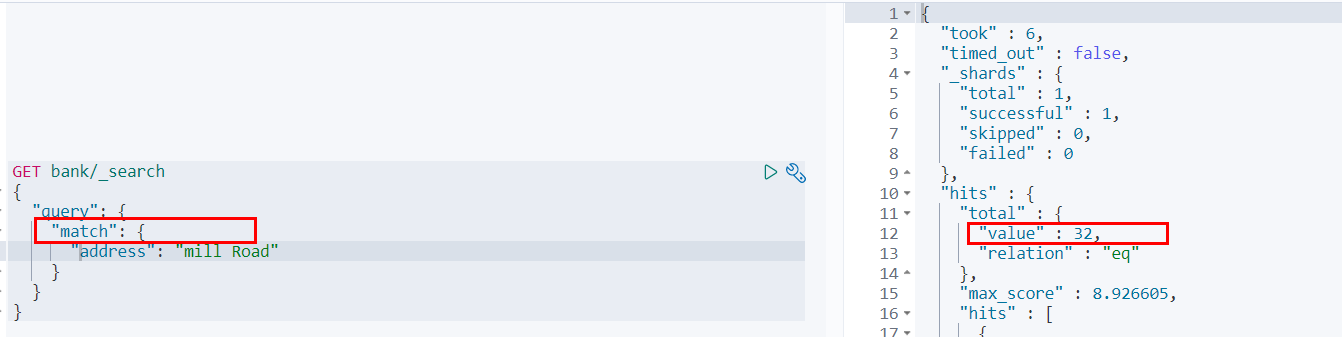 也就是说,全文检索字段用match,其他非text字段匹配用term。
聚合提供了从数据中分组和提取数据的能力。最简单的聚合方法大致等于SQL Group by和SQL聚合函数。在elasticsearch中,执行搜索返回this(命中结果),并且同时返回聚合结果,把以响应中的所有hits(命中结果)分隔开的能力。这是非常强大且有效的,你可以执行查询和多个聚合,并且在一次使用中得到各自的(任何一个的)返回结果,使用一次简洁和简化的API啦避免网络往返。
“size”:0 size:0不显示搜索数据 aggs:执行聚合。聚合语法如下:
"aggs":{ "aggs_name这次聚合的名字,方便展示在结果集中":{ "AGG_TYPE聚合的类型(avg,term,terms)":{} } },搜索address中包含mill的所有人的年龄分布以及平均年龄,但不显示这些人的详情
GET bank/_search { "query": { "match": { "address": "Mill" } }, "aggs": { "ageAgg": { "terms": { "field": "age", "size": 10 } }, "ageAvg": { "avg": { "field": "age" } }, "balanceAvg": { "avg": { "field": "balance" } } }, "size": 0 }查询结果:
{ "took" : 2, "timed_out" : false, "_shards" : { "total" : 1, "successful" : 1, "skipped" : 0, "failed" : 0 }, "hits" : { "total" : { "value" : 4, "relation" : "eq" }, "max_score" : null, "hits" : [ ] }, "aggregations" : { "ageAgg" : { "doc_count_error_upper_bound" : 0, "sum_other_doc_count" : 0, "buckets" : [ { "key" : 38, "doc_count" : 2 }, { "key" : 28, "doc_count" : 1 }, { "key" : 32, "doc_count" : 1 } ] }, "ageAvg" : { "value" : 34.0 }, "balanceAvg" : { "value" : 25208.0 } } }复杂: 按照年龄聚合,并且求这些年龄段的这些人的平均薪资
GET bank/_search { "query": { "match_all": {} }, "aggs": { "ageAgg": { "terms": { "field": "age", "size": 100 }, "aggs": { "ageAvg": { "avg": { "field": "balance" } } } } }, "size": 0 }输出结果:
{ "took" : 49, "timed_out" : false, "_shards" : { "total" : 1, "successful" : 1, "skipped" : 0, "failed" : 0 }, "hits" : { "total" : { "value" : 1000, "relation" : "eq" }, "max_score" : null, "hits" : [ ] }, "aggregations" : { "ageAgg" : { "doc_count_error_upper_bound" : 0, "sum_other_doc_count" : 0, "buckets" : [ { "key" : 31, "doc_count" : 61, "ageAvg" : { "value" : 28312.918032786885 } }, { "key" : 39, "doc_count" : 60, "ageAvg" : { "value" : 25269.583333333332 } }, { "key" : 26, "doc_count" : 59, "ageAvg" : { "value" : 23194.813559322032 } }, { "key" : 32, "doc_count" : 52, "ageAvg" : { "value" : 23951.346153846152 } }, { "key" : 35, "doc_count" : 52, "ageAvg" : { "value" : 22136.69230769231 } }, { "key" : 36, "doc_count" : 52, "ageAvg" : { "value" : 22174.71153846154 } }, { "key" : 22, "doc_count" : 51, "ageAvg" : { "value" : 24731.07843137255 } }, { "key" : 28, "doc_count" : 51, "ageAvg" : { "value" : 28273.882352941175 } }, { "key" : 33, "doc_count" : 50, "ageAvg" : { "value" : 25093.94 } }, { "key" : 34, "doc_count" : 49, "ageAvg" : { "value" : 26809.95918367347 } }, { "key" : 30, "doc_count" : 47, "ageAvg" : { "value" : 22841.106382978724 } }, { "key" : 21, "doc_count" : 46, "ageAvg" : { "value" : 26981.434782608696 } }, { "key" : 40, "doc_count" : 45, "ageAvg" : { "value" : 27183.17777777778 } }, { "key" : 20, "doc_count" : 44, "ageAvg" : { "value" : 27741.227272727272 } }, { "key" : 23, "doc_count" : 42, "ageAvg" : { "value" : 27314.214285714286 } }, { "key" : 24, "doc_count" : 42, "ageAvg" : { "value" : 28519.04761904762 } }, { "key" : 25, "doc_count" : 42, "ageAvg" : { "value" : 27445.214285714286 } }, { "key" : 37, "doc_count" : 42, "ageAvg" : { "value" : 27022.261904761905 } }, { "key" : 27, "doc_count" : 39, "ageAvg" : { "value" : 21471.871794871793 } }, { "key" : 38, "doc_count" : 39, "ageAvg" : { "value" : 26187.17948717949 } }, { "key" : 29, "doc_count" : 35, "ageAvg" : { "value" : 29483.14285714286 } } ] } } }查出所有年龄分布,并且这些年龄段中M的平均薪资和F的平均薪资以及这个年龄段的总体平均薪资
GET bank/_search { "query": { "match_all": {} }, "aggs": { "ageAgg": { "terms": { "field": "age", "size": 100 }, "aggs": { "genderAgg": { "terms": { "field": "gender.keyword" }, "aggs": { "balanceAvg": { "avg": { "field": "balance" } } } }, "ageBalanceAvg": { "avg": { "field": "balance" } } } } }, "size": 0 }输出结果:
{ "took" : 2, "timed_out" : false, "_shards" : { "total" : 1, "successful" : 1, "skipped" : 0, "failed" : 0 }, "hits" : { "total" : { "value" : 1000, "relation" : "eq" }, "max_score" : null, "hits" : [ ] }, "aggregations" : { "ageAgg" : { "doc_count_error_upper_bound" : 0, "sum_other_doc_count" : 0, "buckets" : [ { "key" : 31, "doc_count" : 61, "genderAgg" : { "doc_count_error_upper_bound" : 0, "sum_other_doc_count" : 0, "buckets" : [ { "key" : "M", "doc_count" : 35, "balanceAvg" : { "value" : 29565.628571428573 } }, { "key" : "F", "doc_count" : 26, "balanceAvg" : { "value" : 26626.576923076922 } } ] }, "ageBalanceAvg" : { "value" : 28312.918032786885 } } ] .......//省略其他 } } }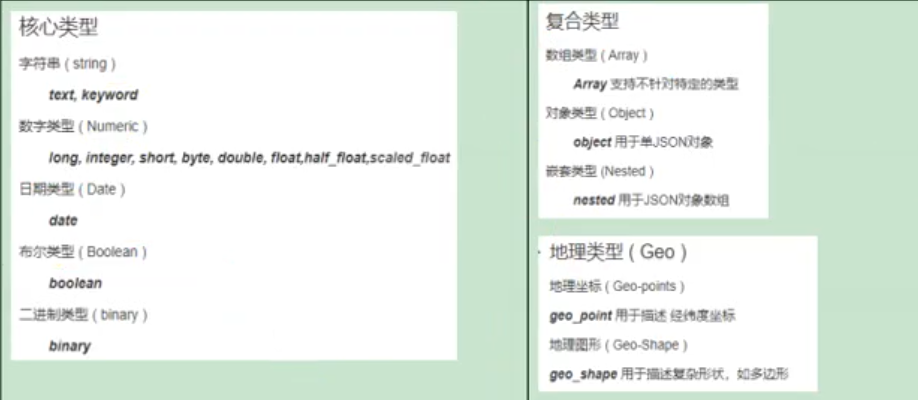
Mapping(映射) Mapping是用来定义一个文档(document),以及它所包含的属性(field)是如何存储和索引的。比如:使用maping来定义:
哪些字符串属性应该被看做全文本属性(full text fields);哪些属性包含数字,日期或地理位置;文档中的所有属性是否都嫩被索引(all 配置);日期的格式;自定义映射规则来执行动态添加属性;查看mapping信息 GET bank/_mapping { "bank" : { "mappings" : { "properties" : { "account_number" : { "type" : "long" }, "address" : { "type" : "text", "fields" : { "keyword" : { "type" : "keyword", "ignore_above" : 256 } } }, "age" : { "type" : "long" }, "balance" : { "type" : "long" }, "city" : { "type" : "text", "fields" : { "keyword" : { "type" : "keyword", "ignore_above" : 256 } } }, "email" : { "type" : "text", "fields" : { "keyword" : { "type" : "keyword", "ignore_above" : 256 } } }, "employer" : { "type" : "text", "fields" : { "keyword" : { "type" : "keyword", "ignore_above" : 256 } } }, "firstname" : { "type" : "text", "fields" : { "keyword" : { "type" : "keyword", "ignore_above" : 256 } } }, "gender" : { "type" : "text", "fields" : { "keyword" : { "type" : "keyword", "ignore_above" : 256 } } }, "lastname" : { "type" : "text", "fields" : { "keyword" : { "type" : "keyword", "ignore_above" : 256 } } }, "state" : { "type" : "text", "fields" : { "keyword" : { "type" : "keyword", "ignore_above" : 256 } } } } } } } 修改mapping信息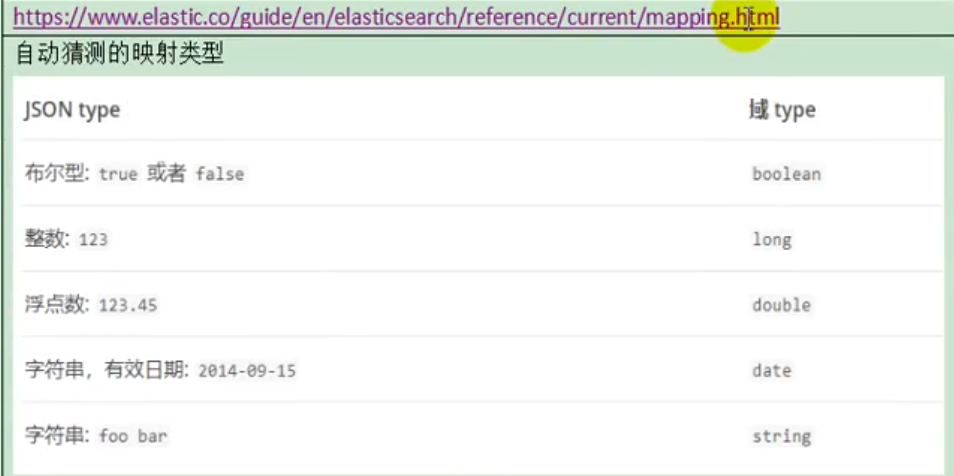
ElasticSearch7-去掉type概念
关系型数据库中两个数据表示是独立的,即使他们里面有相同名称的列也不影响使用,但ES中不是这样的。elasticsearch是基于Lucene开发的搜索引擎,而ES中不同type下名称相同的filed最终在Lucene中的处理方式是一样的。 两个不同type下的两个user_name,在ES同一个索引下其实被认为是同一个filed,你必须在两个不同的type中定义相同的filed映射。否则,不同type中的相同字段名称就会在处理中出现冲突的情况,导致Lucene处理效率下降。去掉type就是为了提高ES处理数据的效率。 Elasticsearch 7.x URL中的type参数为可选。比如,索引一个文档不再要求提供文档类型。Elasticsearch 8.x 不再支持URL中的type参数。解决: 将索引从多类型迁移到单类型,每种类型文档一个独立索引 将已存在的索引下的类型数据,全部迁移到指定位置即可。详见数据迁移Elasticsearch 7.x
Specifying types in requests is deprecated. For instance, indexing a document no longer requires a document type. The new index APIs are PUT {index}/_doc/{id} in case of explicit ids and POST {index}/_doc for auto-generated ids. Note that in 7.0, _doc is a permanent part of the path, and represents the endpoint name rather than the document type.The include_type_name parameter in the index creation, index template, and mapping APIs will default to false. Setting the parameter at all will result in a deprecation warning.The _default_ mapping type is removed.Elasticsearch 8.x
Specifying types in requests is no longer supported.The include_type_name parameter is removed.创建索引并指定映射
PUT /my_index { "mappings": { "properties": { "age": { "type": "integer" }, "email": { "type": "keyword" }, "name": { "type": "text" } } } }输出:
{ "acknowledged" : true, "shards_acknowledged" : true, "index" : "my_index" }输出结果:
{ "my_index" : { "aliases" : { }, "mappings" : { "properties" : { "age" : { "type" : "integer" }, "email" : { "type" : "keyword" }, "employee-id" : { "type" : "keyword", "index" : false }, "name" : { "type" : "text" } } }, "settings" : { "index" : { "creation_date" : "1588410780774", "number_of_shards" : "1", "number_of_replicas" : "1", "uuid" : "ua0lXhtkQCOmn7Kh3iUu0w", "version" : { "created" : "7060299" }, "provided_name" : "my_index" } } } }这里的 “index”: false,表明新增的字段不能被检索,只是一个冗余字段。
对于已经存在的字段映射,我们不能更新。更新必须创建新的索引,进行数据迁移。
先创建new_twitter的正确映射。然后使用如下方式进行数据迁移。
POST reindex [固定写法] { "source":{ "index":"twitter" }, "dest":{ "index":"new_twitters" } }将旧索引的type下的数据进行迁移
POST reindex [固定写法] { "source":{ "index":"twitter", "twitter":"twitter" }, "dest":{ "index":"new_twitters" } }更多详情见: https://www.elastic.co/guide/en/elasticsearch/reference/7.6/docs-reindex.html
GET /bank/_search
{ "took" : 0, "timed_out" : false, "_shards" : { "total" : 1, "successful" : 1, "skipped" : 0, "failed" : 0 }, "hits" : { "total" : { "value" : 1000, "relation" : "eq" }, "max_score" : 1.0, "hits" : [ { "_index" : "bank", "_type" : "account",//类型为account "_id" : "1", "_score" : 1.0, "_source" : { "account_number" : 1, "balance" : 39225, "firstname" : "Amber", "lastname" : "Duke", "age" : 32, "gender" : "M", "address" : "880 Holmes Lane", "employer" : "Pyrami", "email" : "amberduke@pyrami.com", "city" : "Brogan", "state" : "IL" } }, ... GET /bank/_search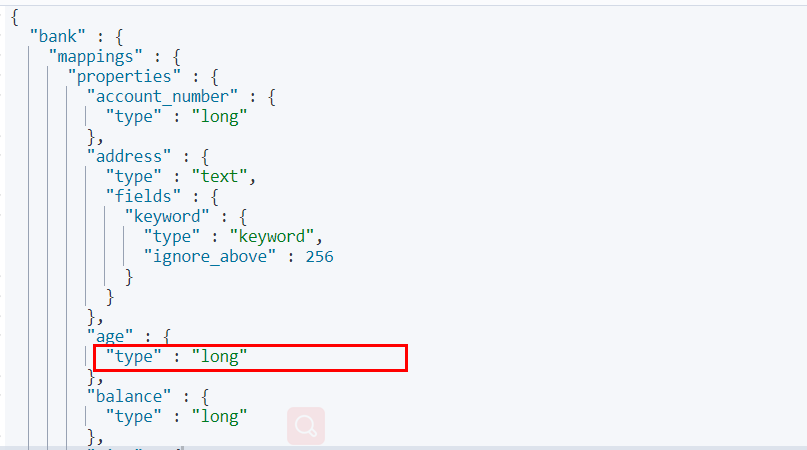 想要将年龄修改为integer
PUT /newbank { "mappings": { "properties": { "account_number": { "type": "long" }, "address": { "type": "text" }, "age": { "type": "integer" }, "balance": { "type": "long" }, "city": { "type": "keyword" }, "email": { "type": "keyword" }, "employer": { "type": "keyword" }, "firstname": { "type": "text" }, "gender": { "type": "keyword" }, "lastname": { "type": "text", "fields": { "keyword": { "type": "keyword", "ignore_above": 256 } } }, "state": { "type": "keyword" } } } }查看“newbank”的映射: GET /newbank/_mapping 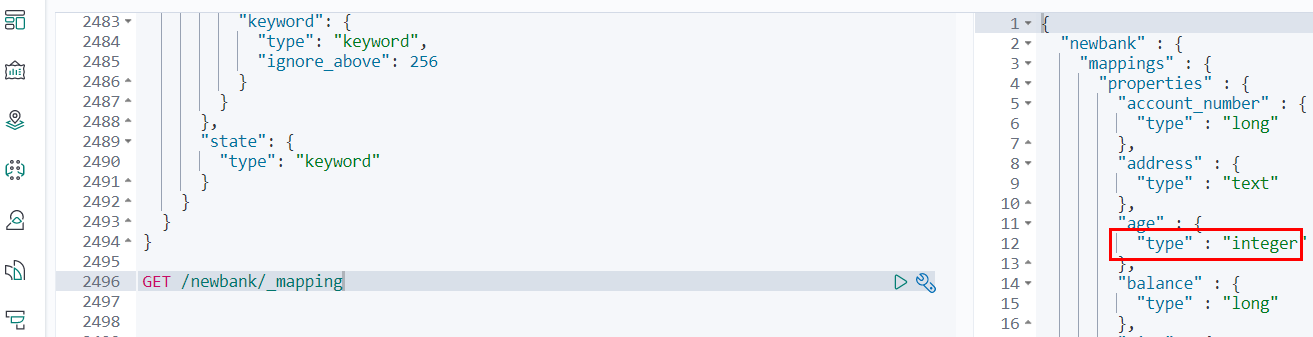 能够看到age的映射类型被修改为了integer. 将bank中的数据迁移到newbank中
POST _reindex { "source": { "index": "bank", "type": "account" }, "dest": { "index": "newbank" } }运行输出:
#! Deprecation: [types removal] Specifying types in reindex requests is deprecated. { "took" : 279, "timed_out" : false, "total" : 1000, "updated" : 0, "created" : 1000, "deleted" : 0, "batches" : 1, "version_conflicts" : 0, "noops" : 0, "retries" : { "bulk" : 0, "search" : 0 }, "throttled_millis" : 0, "requests_per_second" : -1.0, "throttled_until_millis" : 0, "failures" : [ ] }查看newbank中的数据 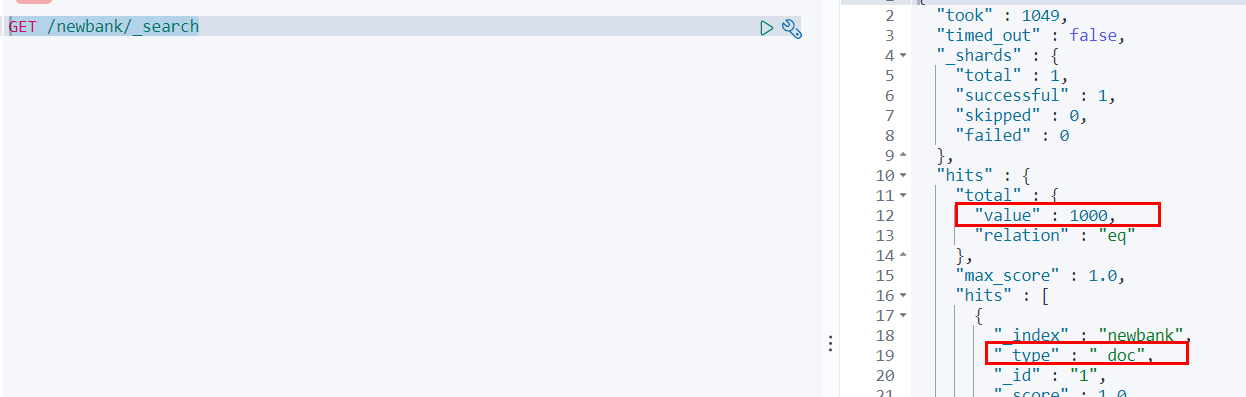
一个tokenizer(分词器)接收一个字符流,将之分割为独立的tokens(词元,通常是独立的单词),然后输出tokens流。 例如:whitespace tokenizer遇到空白字符时分割文本。它会将文本“Quick brown fox!”分割为[Quick,brown,fox!]。 该tokenizer(分词器)还负责记录各个terms(词条)的顺序或position位置(用于phrase短语和word proximity词近邻查询),以及term(词条)所代表的原始word(单词)的start(起始)和end(结束)的character offsets(字符串偏移量)(用于高亮显示搜索的内容)。 elasticsearch提供了很多内置的分词器,可以用来构建custom analyzers(自定义分词器)。 关于分词器: https://www.elastic.co/guide/en/elasticsearch/reference/7.6/analysis.html
POST _analyze { "analyzer": "standard", "text": "The 2 QUICK Brown-Foxes jumped over the lazy dog's bone." }执行结果:
{ "tokens" : [ { "token" : "the", "start_offset" : 0, "end_offset" : 3, "type" : "<ALPHANUM>", "position" : 0 }, { "token" : "2", "start_offset" : 4, "end_offset" : 5, "type" : "<NUM>", "position" : 1 }, { "token" : "quick", "start_offset" : 6, "end_offset" : 11, "type" : "<ALPHANUM>", "position" : 2 }, { "token" : "brown", "start_offset" : 12, "end_offset" : 17, "type" : "<ALPHANUM>", "position" : 3 }, { "token" : "foxes", "start_offset" : 18, "end_offset" : 23, "type" : "<ALPHANUM>", "position" : 4 }, { "token" : "jumped", "start_offset" : 24, "end_offset" : 30, "type" : "<ALPHANUM>", "position" : 5 }, { "token" : "over", "start_offset" : 31, "end_offset" : 35, "type" : "<ALPHANUM>", "position" : 6 }, { "token" : "the", "start_offset" : 36, "end_offset" : 39, "type" : "<ALPHANUM>", "position" : 7 }, { "token" : "lazy", "start_offset" : 40, "end_offset" : 44, "type" : "<ALPHANUM>", "position" : 8 }, { "token" : "dog's", "start_offset" : 45, "end_offset" : 50, "type" : "<ALPHANUM>", "position" : 9 }, { "token" : "bone", "start_offset" : 51, "end_offset" : 55, "type" : "<ALPHANUM>", "position" : 10 } ] }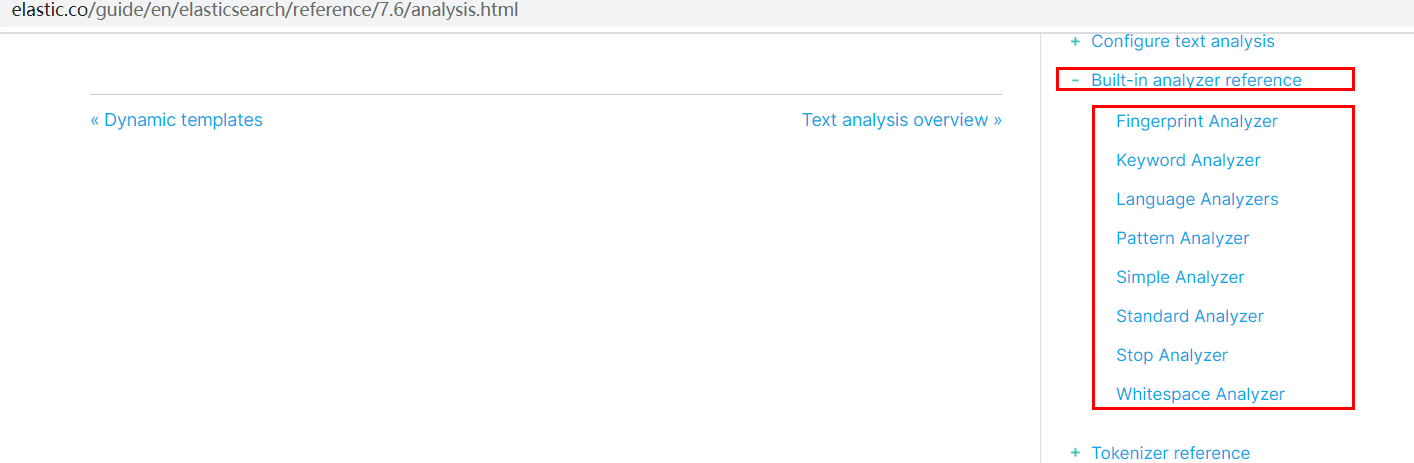 所有的语言分词,默认使用的都是“Standard Analyzer”,但是这些分词器针对于中文的分词,并不友好。为此需要安装中文的分词器。 注意:不能用默认elasticsearch-plugin install xxx.zip 进行自动安装 https://github.com/medcl/elasticsearch-analysis-ik/releases/download 对应es版本安装 在前面安装的elasticsearch时,我们已经将elasticsearch容器的“/usr/share/elasticsearch/plugins”目录,映射到宿主机的“ /mydata/elasticsearch/plugins”目录下,所以比较方便的做法就是下载“/elasticsearch-analysis-ik-7.6.2.zip”文件,然后解压到该文件夹下即可。安装完毕后,需要重启elasticsearch容器。 如果不嫌麻烦,还可以采用如下的方式。
确认是否安装好了分词器
使用默认
GET my_index/_analyze { "text":"我是中国人" }请观察执行结果:
{ "tokens" : [ { "token" : "我", "start_offset" : 0, "end_offset" : 1, "type" : "<IDEOGRAPHIC>", "position" : 0 }, { "token" : "是", "start_offset" : 1, "end_offset" : 2, "type" : "<IDEOGRAPHIC>", "position" : 1 }, { "token" : "中", "start_offset" : 2, "end_offset" : 3, "type" : "<IDEOGRAPHIC>", "position" : 2 }, { "token" : "国", "start_offset" : 3, "end_offset" : 4, "type" : "<IDEOGRAPHIC>", "position" : 3 }, { "token" : "人", "start_offset" : 4, "end_offset" : 5, "type" : "<IDEOGRAPHIC>", "position" : 4 } ] } GET my_index/_analyze { "analyzer": "ik_smart", "text":"我是中国人" }输出结果:
{ "tokens" : [ { "token" : "我", "start_offset" : 0, "end_offset" : 1, "type" : "CN_CHAR", "position" : 0 }, { "token" : "是", "start_offset" : 1, "end_offset" : 2, "type" : "CN_CHAR", "position" : 1 }, { "token" : "中国人", "start_offset" : 2, "end_offset" : 5, "type" : "CN_WORD", "position" : 2 } ] } GET my_index/_analyze { "analyzer": "ik_max_word", "text":"我是中国人" }输出结果:
{ "tokens" : [ { "token" : "我", "start_offset" : 0, "end_offset" : 1, "type" : "CN_CHAR", "position" : 0 }, { "token" : "是", "start_offset" : 1, "end_offset" : 2, "type" : "CN_CHAR", "position" : 1 }, { "token" : "中国人", "start_offset" : 2, "end_offset" : 5, "type" : "CN_WORD", "position" : 2 }, { "token" : "中国", "start_offset" : 2, "end_offset" : 4, "type" : "CN_WORD", "position" : 3 }, { "token" : "国人", "start_offset" : 3, "end_offset" : 5, "type" : "CN_WORD", "position" : 4 } ] }安装nginx(见附录)
修改/usr/share/elasticsearch/plugins/ik/config中的IKAnalyzer.cfg.xml /usr/share/elasticsearch/plugins/ik/config
<?xml version="1.0" encoding="UTF-8"?> <!DOCTYPE properties SYSTEM "http://java.sun.com/dtd/properties.dtd"> <properties> <comment>IK Analyzer 扩展配置</comment> <!--用户可以在这里配置自己的扩展字典 --> <entry key="ext_dict"></entry> <!--用户可以在这里配置自己的扩展停止词字典--> <entry key="ext_stopwords"></entry> <!--用户可以在这里配置远程扩展字典 --> <entry key="remote_ext_dict">http://192.168.56.10/es/fenci.txt</entry> <!--用户可以在这里配置远程扩展停止词字典--> <!-- <entry key="remote_ext_stopwords">words_location</entry> --> </properties>原来的xml
<?xml version="1.0" encoding="UTF-8"?> <!DOCTYPE properties SYSTEM "http://java.sun.com/dtd/properties.dtd"> <properties> <comment>IK Analyzer 扩展配置</comment> <!--用户可以在这里配置自己的扩展字典 --> <entry key="ext_dict"></entry> <!--用户可以在这里配置自己的扩展停止词字典--> <entry key="ext_stopwords"></entry> <!--用户可以在这里配置远程扩展字典 --> <!-- <entry key="remote_ext_dict">words_location</entry> --> <!--用户可以在这里配置远程扩展停止词字典--> <!-- <entry key="remote_ext_stopwords">words_location</entry> --> </properties>修改完成后,需要重启elasticsearch容器,否则修改不生效。 更新完成后,es只会对于新增的数据用更新分词。历史数据是不会重新分词的。如果想要历史数据重新分词,需要执行:
POST my_index/_update_by_query?conflicts=proceedhttp://192.168.56.10/es/fenci.txt,这个是nginx上资源的访问路径 在运行下面实例之前,需要安装nginx(安装方法见安装nginx),然后创建“fenci.txt”文件,内容如下:
刘亦菲测试效果:
GET my_index/_analyze { "analyzer": "ik_max_word", "text":"刘亦菲爱我" }输出结果:
{ "tokens" : [ { "token" : "刘亦菲", "start_offset" : 0, "end_offset" : 3, "type" : "CN_WORD", "position" : 0 }, { "token" : "爱我", "start_offset" : 3, "end_offset" : 5, "type" : "CN_WORD", "position" : 1 } ] }只是为了复制出配置
docker run -p80:80 --name nginx -d nginx:1.10 将容器内的配置文件拷贝到/mydata/nginx/conf/ 下 mkdir -p /mydata/nginx/html mkdir -p /mydata/nginx/logs mkdir -p /mydata/nginx/conf docker container cp nginx:/etc/nginx/* /mydata/nginx/conf/ #由于拷贝完成后会在config中存在一个nginx文件夹,所以需要将它的内容移动到conf中 mv /mydata/nginx/conf/nginx/* /mydata/nginx/conf/ rm -rf /mydata/nginx/conf/nginx 终止原容器: docker stop nginx 执行命令删除原容器: docker rm nginx 创建新的Nginx,执行以下命令 docker run -p 80:80 --name nginx \ -v /mydata/nginx/html:/usr/share/nginx/html \ -v /mydata/nginx/logs:/var/log/nginx \ -v /mydata/nginx/conf/:/etc/nginx \ -d nginx:1.10 设置开机启动nginx docker update nginx --restart=always 创建“/mydata/nginx/html/index.html”文件,测试是否能够正常访问 echo '<h2>hello nginx!</h2>' >index.html扩展字典 --> http://192.168.56.10/es/fenci.txt
原来的xml ```xml <?xml version="1.0" encoding="UTF-8"?> <!DOCTYPE properties SYSTEM "http://java.sun.com/dtd/properties.dtd"> <properties> <comment>IK Analyzer 扩展配置</comment> <!--用户可以在这里配置自己的扩展字典 --> <entry key="ext_dict"></entry> <!--用户可以在这里配置自己的扩展停止词字典--> <entry key="ext_stopwords"></entry> <!--用户可以在这里配置远程扩展字典 --> <!-- <entry key="remote_ext_dict">words_location</entry> --> <!--用户可以在这里配置远程扩展停止词字典--> <!-- <entry key="remote_ext_stopwords">words_location</entry> --> </properties>修改完成后,需要重启elasticsearch容器,否则修改不生效。 更新完成后,es只会对于新增的数据用更新分词。历史数据是不会重新分词的。如果想要历史数据重新分词,需要执行:
POST my_index/_update_by_query?conflicts=proceedhttp://192.168.56.10/es/fenci.txt,这个是nginx上资源的访问路径 在运行下面实例之前,需要安装nginx(安装方法见安装nginx),然后创建“fenci.txt”文件,内容如下:
刘亦菲测试效果:
GET my_index/_analyze { "analyzer": "ik_max_word", "text":"刘亦菲爱我" }输出结果:
{ "tokens" : [ { "token" : "刘亦菲", "start_offset" : 0, "end_offset" : 3, "type" : "CN_WORD", "position" : 0 }, { "token" : "爱我", "start_offset" : 3, "end_offset" : 5, "type" : "CN_WORD", "position" : 1 } ] }